
In the digital workplace, the intricate web of communications, collaborations, and operations hinge on platforms that foster efficiency and connectivity. Here, standing at the forefront are two pivotal technologies – the traditional yet ever-evolving intranet and the mobile-centric employee app. Yet, what’s not clear is how they are different. What are the unique use cases of an intranet and how do they contrast with an employee app? In this series of articles on “Intranet vs. Employee App” we will uncover those differences, and some similarities – so everyone can have a clearer picture of these technologies and how they should be used.
Origins of the Intranet
Cast your mind back to the earlier days of corporate dynamics. Intranets emerged as the digital reincarnates of physical bulletin boards and file cabinets. These platforms, primarily desktop-centric, resonated as the central hub for all employees. Boasting vast repositories of documents and facilitating organization-wide collaborations. A visit to the intranet was akin to a detailed library visit. Here one could delve into comprehensive data and rich content depth with a focused approach to collaborative spaces.
Origins of Employee Apps
As time moved forward, the employee app emerged. Rising from the bustling wave of smartphone usage, offering on-the-go access to work-related resources. Imagine the employee app as your personal assistant. It’s always there in your pocket, ready to offer real-time updates, personalized notifications, and immediate solutions. All tailored to enhance individual productivity and engagement.
Yet, despite their distinctive origins and primary focus areas, intranets and employee apps share a collaborative spirit. This nucleus of functions can facilitate communication, and access to essential resources, each providing a canvas of modern workplace functionalities. However, that’s only true if each are used appropriately.
How Intranets and Employee Apps Are Used
So, where do we stand today? Let us unpack the layered dynamics of intranets and employee apps. As we explore their commonalities, differences, and the unique flavors they bring to the employee journey, you’ll get clear view of their roles and use cases.
Join us in part one of our series exploring the organized experience of an intranet, contrasted with a more personal touch of employee apps. We will first cover the origins of each, and the appropriate focus an organization should apply to these technologies. Throughout the series, we hope to lay the groundwork to understand these important tools in the modern corporate world. And we hope to reduce some of the confusion that surrounds these terms today.
Intranet Use Case
Intranets started as internal websites or portals for companies. They were the digital evolution of physical bulletin boards, file cabinets, and company directories. It began as a way to centralize resources. Provide quick access to commonly used materials, and better organize the company’s digital information. The technology has evolved since, but the primary use case remains the same. Provide a secure, internal information hub that allows employees to access content and resources from anywhere.
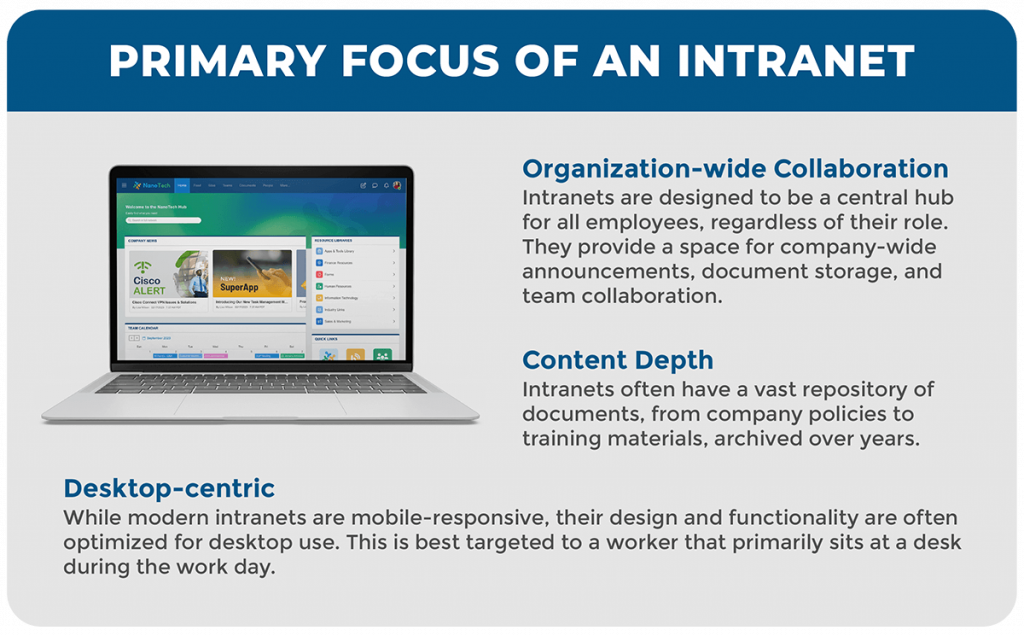
The Primary Focus of an Intranet:
In the evolving landscape of employee experience, intranets have carved out a pivotal role – fostering connectivity and information sharing across all levels of an organization. Functioning as a central hub, they facilitate organization-wide collaboration, housing important announcements and encouraging team synergy. Intranets not only offer a rich depth of content, becoming a reservoir of essential documents accumulated over years. They also retain a desktop-centric design, providing an optimized experience for users accessing it through desktop platforms. As such, intranet use cases are best focused in three primary areas:
- Organization-wide Collaboration: Intranets are a central hub for all employees. Regardless of their role as they provide a space for company-wide announcements, document storage, and team collaboration.
- Content Depth: Intranets often have a vast repository of documents, from company policies to training materials, archived over years.
- Desktop-centric: While modern intranets have some mobile-responsiveness, they’re optimized for desktop use. This makes it an experience that is best for a worker that primarily sits at a desk during the work day.
Employee App Use Case:
As we adapted to the smartphone revolution, the introduction of employee apps marked a significant stride in the corporate world. This brings the workplace into the palm of our hands. They were initially created to facilitate immediate access to work-related tools and information wherever one might be. The primary focus of employee apps has always been to foster individual productivity and real-time engagement.
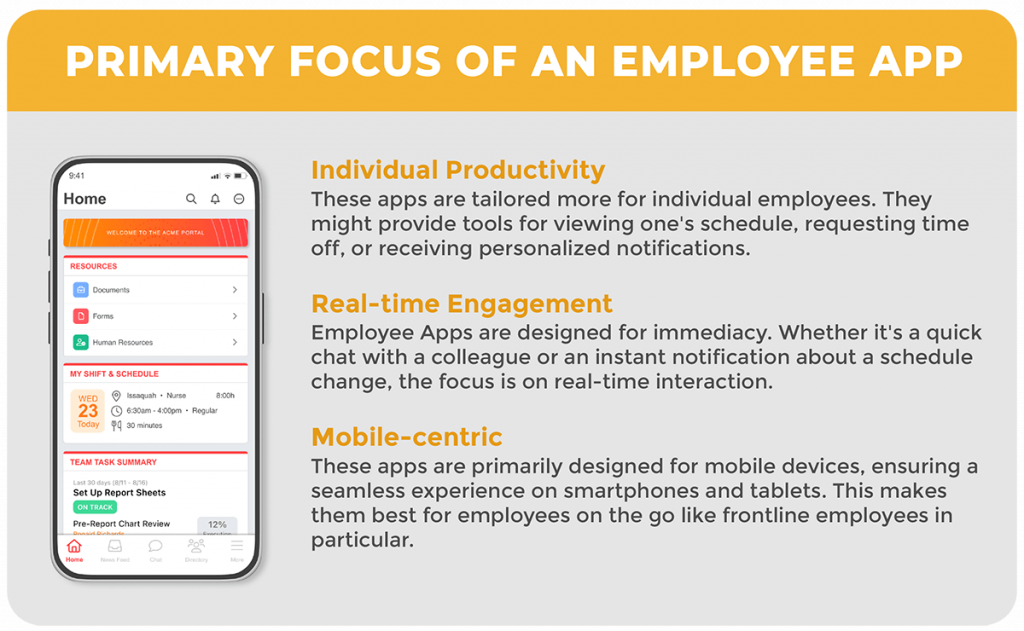
Primary Focus of an Employee App:
The emphasis of an employee app is on streamlining communications and operations through real-time interactions. Moreover, with a mobile-centric design, these apps guarantee a seamless user experience on smartphones and tablets. Thus, it has become an indispensable tool for modern employees especially on the frontline. The three use cases where employee apps excel are:
- Individual Productivity: These apps provide a personalized experience for individual employees. They might provide tools for viewing one’s schedule, requesting time off, or receiving personalized notifications.
- Real-time Engagement: The aim of an employee app is immediacy. Whether it’s a quick chat with a colleague or an instant notification about a schedule change, the focus is on real-time interaction.
- Mobile-centric: These apps are designed for mobile devices. This makes them best for employees on the go like frontline employees in particular.
As we continue to uncover the nuances of intranets and employee apps, it becomes evident that both have carved out indispensable niches. In the corporate ecosystem of the digital workplace they have distinct use cases. The intranet, with its rich history, continues to be a repository of deep-seated knowledge. It fosters organization-wide collaboration with a nuanced tilt towards a desktop-centric experience. On the other hand, the employee app personalizes the work experience. It brings immediacy and individual productivity into sharp focus, especially for frontline employees.
Next in the series we will talk about the commonalities between intranets and employee apps. The ways in which they are similar and how they might overlap in use.
Part 2: Commonalities Between a Modern Intranet and an Employee App
Get the best of both worlds with MangoApps Employee SuperApp! Not ready for that transformation? Start with either a MangoApps Modern Intranet or MangoApps Employee App and we’ll help you transform to a SuperApp when you are ready.
The MangoApps Team
We're the product, research, and strategy team behind MangoApps — the unified frontline workforce management platform and employee communication and engagement suite trusted by organizations in healthcare, manufacturing, retail, hospitality, and the public sector to connect every employee — deskless or desk-based — to the people, tools, and information they need.
We write about enterprise AI for the workplace, internal communications, AI-powered intranets, workforce management, and the operating patterns behind highly engaged frontline teams. Our perspective is grounded in a decade of building for frontline-heavy industries and shipping AI agents, employee apps, and integrated HR workflows that real employees actually use.
For short-form takes, product news, and field notes from customer rollouts, follow Frontline Wire — our ongoing stream on AI, frontline work, and the modern digital workplace — or learn more about MangoApps.